Microsoft 365 · Power Automate · SharePoint

The approval is
stuck somewhere.
Nobody knows where.

Purchase requests, budget sign-offs, leave approvals - your team submits them and then waits. No tracking. No reminders. No accountability. Just email threads and chaser messages that go nowhere.

Purchase Request - Q1 Equipment ● In progress
Requested by Jana Novák
Started 2026/02/28
Current step Line Manager
Due 2026/03/07
Team Lead review
Tomas Riha
Approved
2
Line Manager approval
Petra Svoboda · reminder sent
Pending
3
Finance sign-off
Finance group
Waiting
4
Director final approval
Jiří Zeman
Waiting

Email was never
built for decisions

Someone submits a request. It lands in an inbox. Days pass. You send a follow-up. More days pass. Eventually you find out the approval was given two weeks ago - but nobody told the person waiting. Or worse: it was never approved at all, because the right person was on holiday and nobody thought to delegate.

"Just forward this to the finance team and let me know how it goes."

Every organisation has a version of this story. Decisions get made eventually - but the process of getting there wastes time, loses records, and leaves everyone in the dark.

You know approval processes can be consistent, tracked, and automatic. You've probably seen it in enterprise tools. You just don't think you can get there inside Microsoft 365 without months of IT work and budget you don't have.

  • ?Who is currently holding up this request?
  • ?When was the last reminder sent - and by whom?
  • ?What happens when the approver is on holiday?
  • ?Where is the audit record of what was approved and when?
  • ?How do you update the approval chain when people change roles?
  • ?What if the request needs to go back for revision?
  • ?How do you know when a process has silently stopped?
  • The Approval Process Solution handles all of this.
🏢Deployed in tens of organisations
Live in under 1 hour
🔒Runs in your tenant - nothing leaves your org
🛠2+ years of refinement
Free lifetime updates

Approvals that move
forward on their own

What if a purchase request moved forward the moment it was submitted - without you sending a single follow-up?

What if you could open a list and see, at a glance, exactly where every pending decision stands - who is currently reviewing it, when it was last updated, whether a reminder has already gone out?

What if someone goes on holiday and their approval tasks automatically route to a colleague - no one needs to remember, no one needs to intervene, the process just keeps moving?

What if a request gets sent back for changes, comes back revised, and continues through the chain from the right step - without restarting from the beginning?

What if, six months later, an auditor asks who approved the Q3 marketing budget - and you can pull up the complete decision log, with names, timestamps, and comments, in under a minute?

Broken approval chains cost time, create compliance risk, and erode trust across teams. But it does not have to be this way - and you do not need to build the solution yourself.

Everything your approval
process actually needs

Not a prototype. A complete, production-tested solution - built to handle every scenario that breaks a real approval chain in a real organisation.

Built entirely on tools your organisation already has - Power Automate and SharePoint, inside your existing Microsoft 365 subscription. No new software to approve, no new vendor to onboard, no additional licence cost.

01

You'll always know where a request stands

Every request shows its current step, current approver, and status - visible at any time, without asking anyone. No more "did anyone look at this yet?"

02

No request gets lost or forgotten

Automatic reminders go out when deadlines approach. Requests never stall in an inbox because someone forgot to check - the process follows up so you don't have to.

03

Holidays don't stop the process

Set up delegation and approvals automatically route to a colleague when someone is away. No bottlenecks, no stopped chains, no requests waiting for someone to return.

04

A full audit trail, always ready

Every decision is permanently logged - who approved it, when, and what they said. Ready for compliance, auditors, or management at a moment's notice.

05

Change the chain without IT involvement

Approvers, steps, and routing are configured directly in SharePoint. When your organisation changes, your approval process updates in minutes - no developer needed.

06

Works for any type of request

Purchase approvals, leave requests, budget sign-offs, contract reviews - use the same process framework across multiple request types in your organisation.

Your IT contact sets this up once. After that, your team just submits requests - the rest happens automatically.
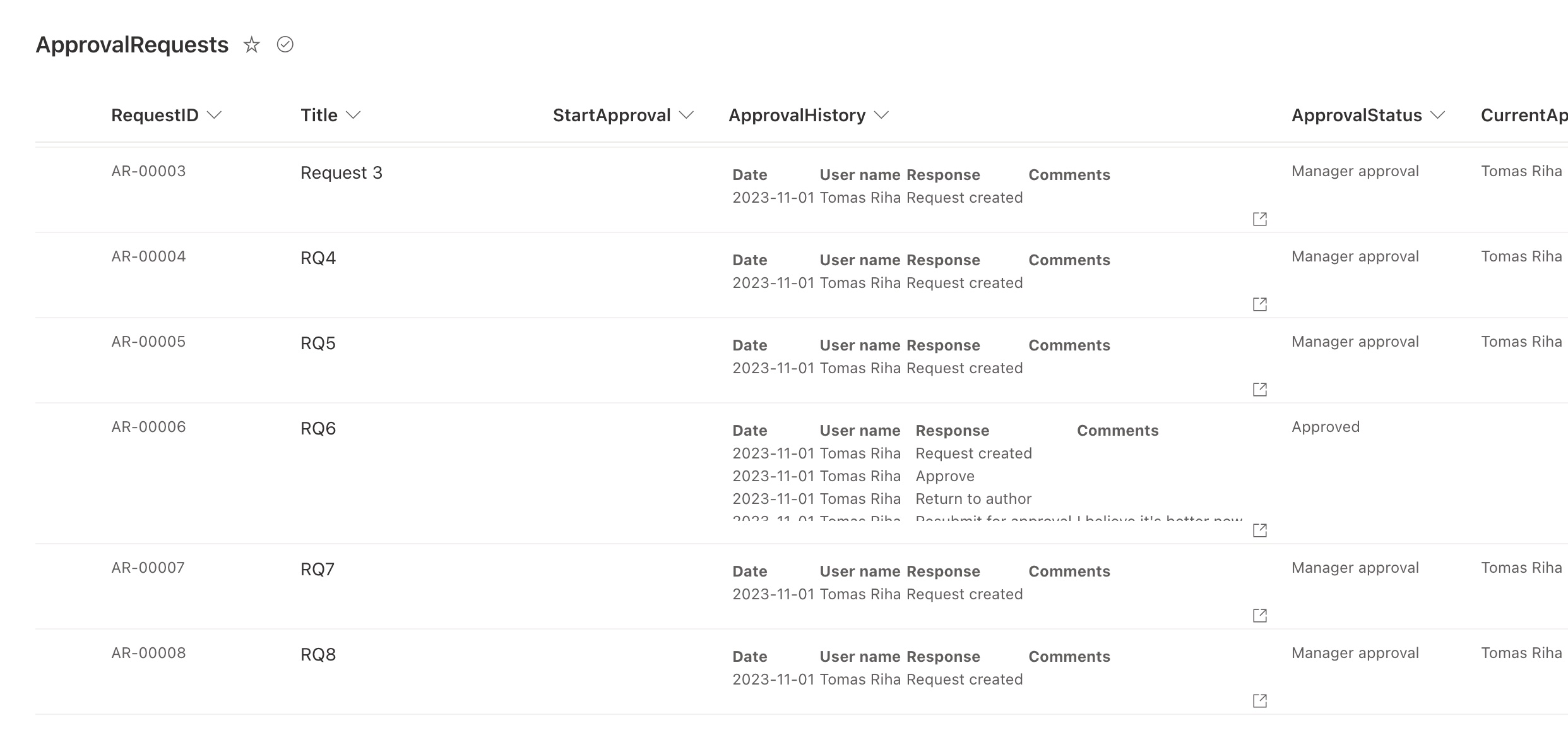
The ApprovalRequests SharePoint list showing live requests with status, current approver, and full history
Approval requests list
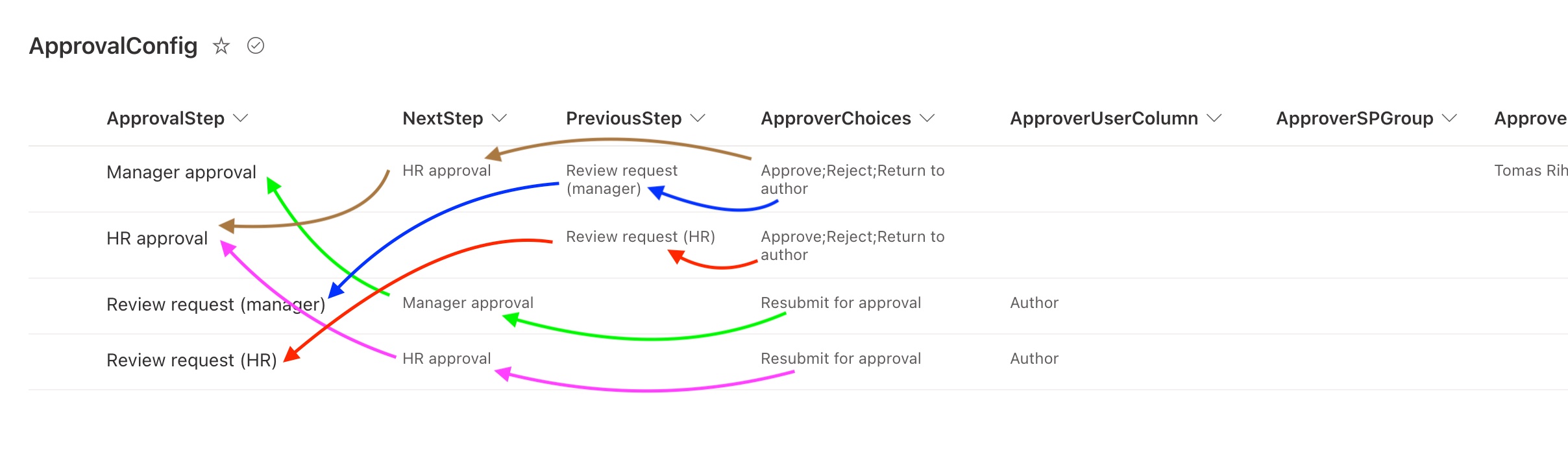
ApprovalConfig SharePoint list - configure approvers, steps, and responses without touching the flow
No-code configuration
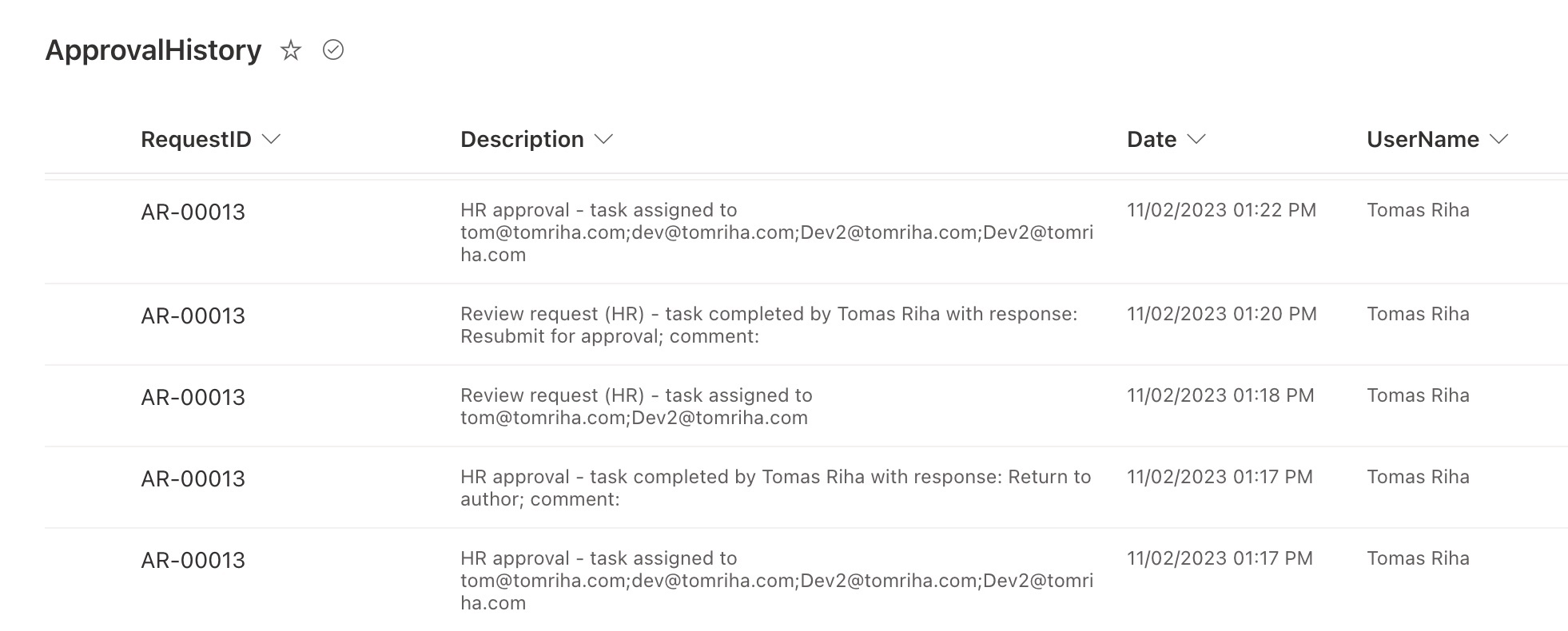
ApprovalHistory SharePoint list showing every decision, approver, timestamp, and comment
Audit trail
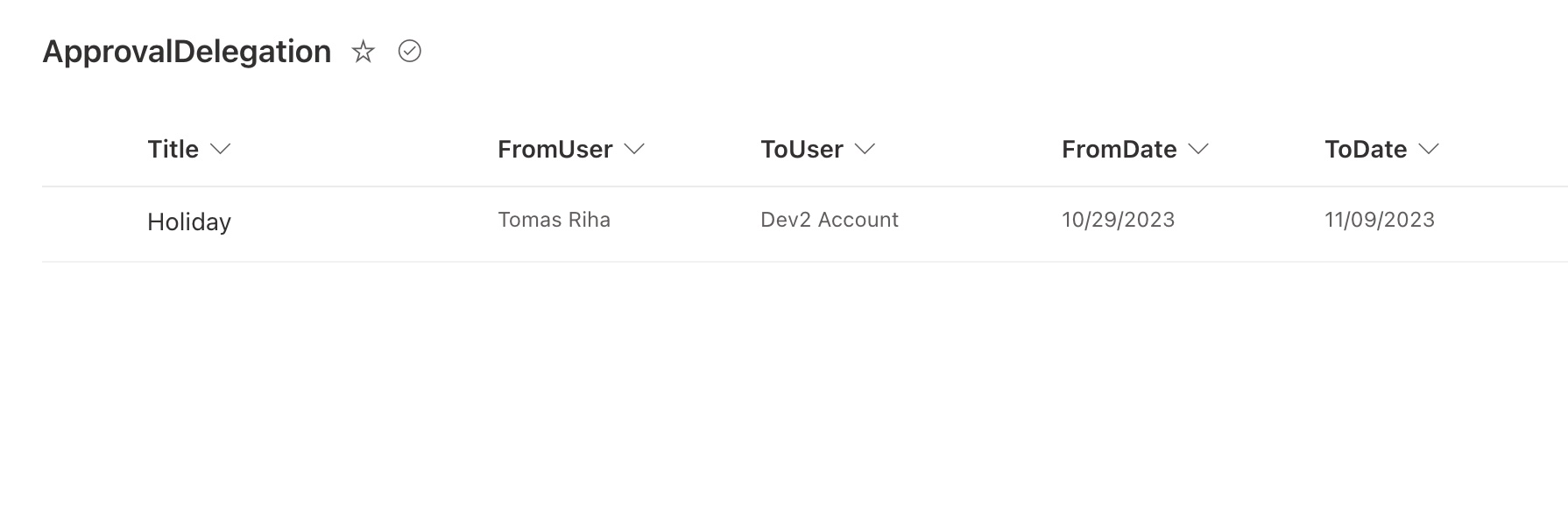
ApprovalDelegation SharePoint list - set a delegate approver for a date range when someone is away
Delegation management
The complete Power Automate approval flow - fully built and ready to import
Main approval flow
The recurring reminder flow - automatically checks for overdue tasks and sends email reminders
Recurring reminder flow
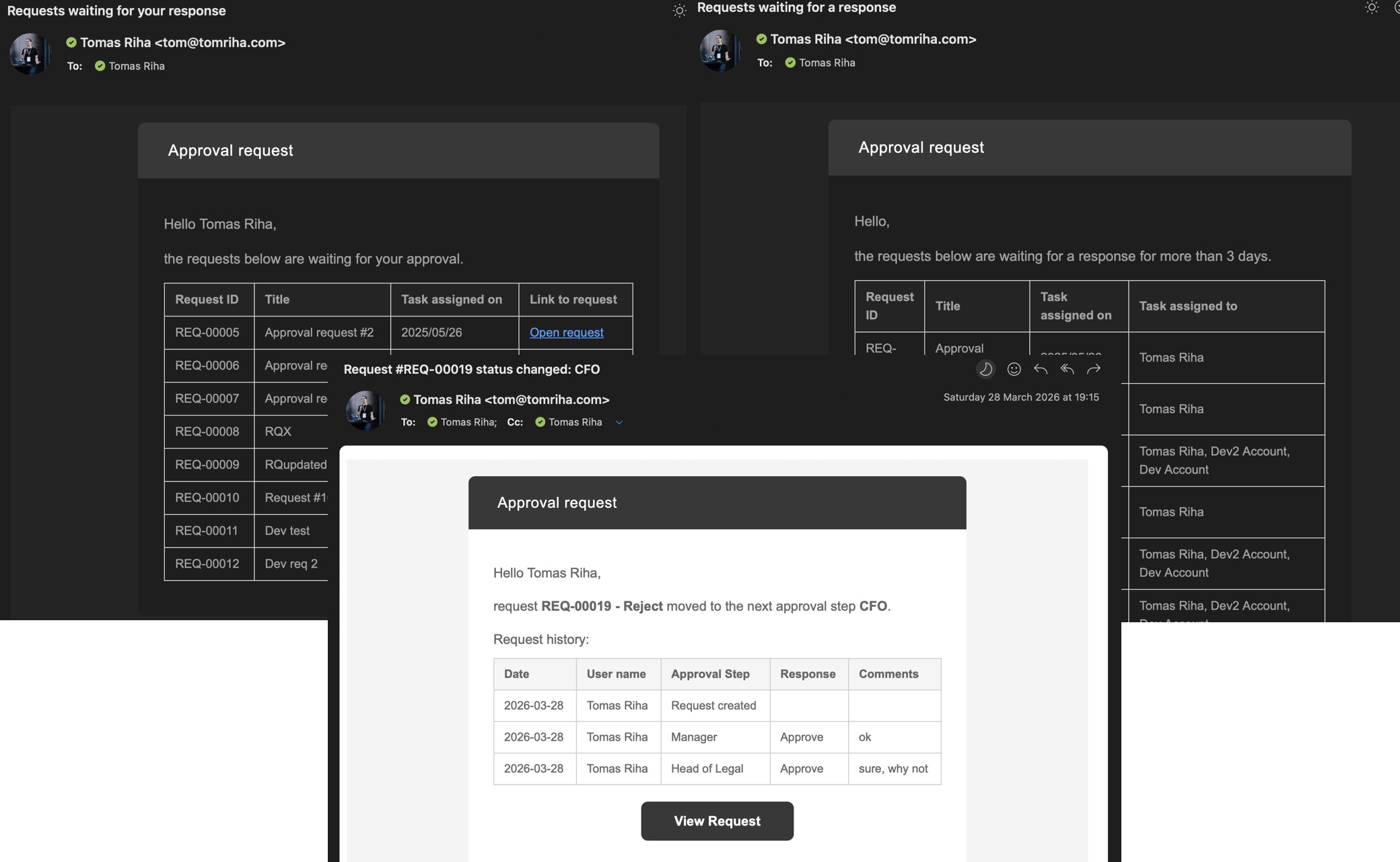
Outlook email notifications sent by the solution: approval task, overdue reminder, and status-change update
Email notifications

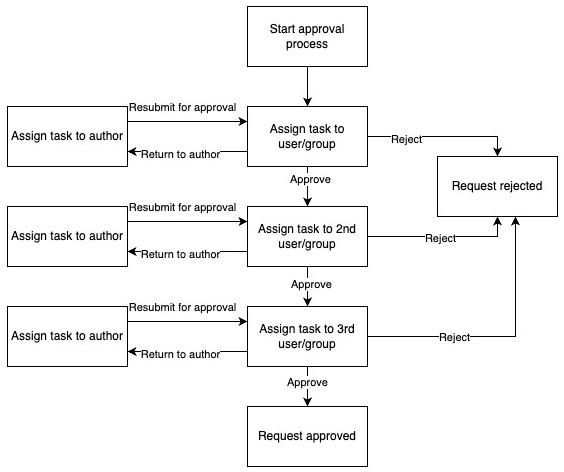
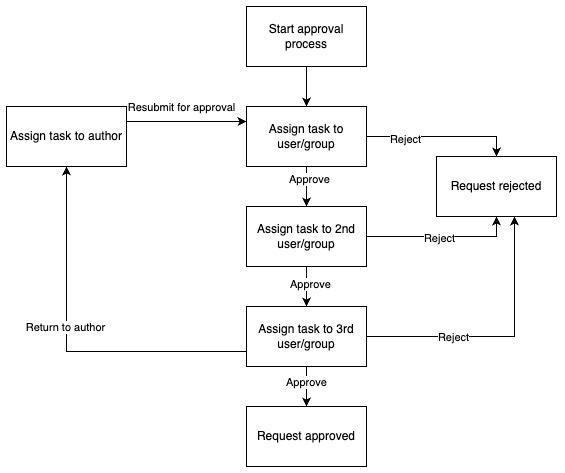
Sometimes an approver needs to send a request back for revision. You can configure exactly how that works - no flow editing required.
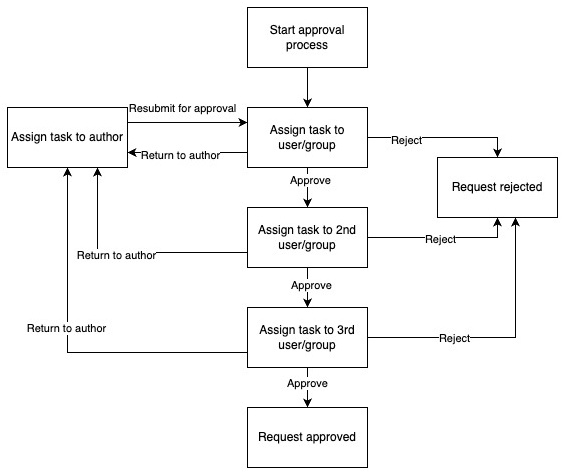
State machine diagram: any approval step can return the request back to the author for revision
Send back anytime to start from the beginning
State machine diagram: only the final approval step can return the request back to the author
Send back only from specific step(s)
State machine diagram: each step has its own independent return-to-author loop
Review and continue where you stopped

A proven solution,
not a prototype

Built and refined across real organisations over two years - packaged so your team can go from zero to running approvals in under an hour.

  • A complete, production-ready approval automation - fully tested, not a template to finish yourself
  • SharePoint lists to manage the process - change approvers and steps without touching the flow
  • Step-by-step setup guide - from download to live in under an hour
  • Extension guide - practical adjustments to fit your specific process
  • Full documentation - understand and maintain it independently
  • Free lifetime updates - all future improvements included at no extra cost
  • Runs entirely inside your Microsoft 365 tenant - no new subscriptions, no data leaving your org
// Deployment process

Your IT contact
can have it live
in under an hour

  • 01Create a new flow with the correct trigger in Power Automate
  • 02Copy the JSON file content and paste it directly into the flow
  • 03Update connections and configure the single setup action
  • 04Done - start running approval processes immediately

No Dataverse · No special roles · No IT ticket

One purchase.
Lifetime access.

Pick the licence that fits your use case. All paid licences include the full solution, documentation, and free updates forever.

Pro
$79
For one process in your organisation - purchase approvals, leave requests, or any single workflow.
Buy Pro
  • Full-featured flow
  • Setup guide & docs
  • Production use
  • Multiple environments
  • Client / team use
Single use · 1 process
Consultant
$149
For consultants and agencies deploying for client organisations.
Buy Consultant
  • Full-featured flow
  • Setup guide & docs
  • Multiple environments
  • Unlimited client use
  • Team / multi-user access
Unlimited client projects

Covers client deployments. For internal team sharing, see Enterprise.

Enterprise
$199
For teams rolling out approvals across multiple processes and departments.
Buy Enterprise
  • Full-featured flow
  • Setup guide & docs
  • Multiple environments
  • Team / multi-user access
  • Unlimited internal use
Unlimited internal use

Need help with setup or custom adjustments? Book a consulting session →

Common questions,
straight answers

What kinds of approval processes can I use this for?
Any process where a request needs to pass through one or more people before it is approved - purchase requests, leave approvals, budget sign-offs, contract reviews, onboarding steps. If it involves decisions, it fits.
What happens when an approver doesn't respond?
The solution sends automatic reminders before deadlines are missed. You configure how often and when - the process follows up without you having to chase anyone manually.
Do approvers need to log into a system to approve?
No. Approvers receive an email with the request details and approve or reject directly from the email - no portal, no login, no new tool to learn.
Is there a record of who approved what and when?
Yes - every decision is permanently logged in SharePoint with the approver's name, timestamp, and any comments. It stays there indefinitely, ready for compliance or management reviews.
What if our approval chain changes - people change roles, leave, or join?
You update the approval chain directly in a SharePoint list - no one needs to edit the flow or involve a developer. Changes take effect immediately on the next request.
Does our data stay inside our organisation?
Completely. Once imported, the entire solution runs inside your Microsoft 365 tenant using your own accounts and SharePoint. Nothing is sent outside your organisation.
What does our team need to get started?
A Microsoft 365 account with access to Power Automate and a SharePoint site. No Dataverse, no special licences, no IT department involvement required - a step-by-step setup guide is included.
How do we know it will work for our process?
The screenshots on this page show exactly what gets deployed - the approval flow, configuration lists, audit log, and email notifications. If you have a specific process in mind or want to walk through it before buying, book a consulting session and we can go through it together.

Run your next approval
without a single chaser email

Get the full solution and have approvals running on their own - today. Questions first? Book a consulting session and we'll walk through your specific process together.

// by Workappholics  ·  Microsoft 365 · Power Automate · SharePoint